BioRender Pricing, Limitations, and Best Alternatives (2026)
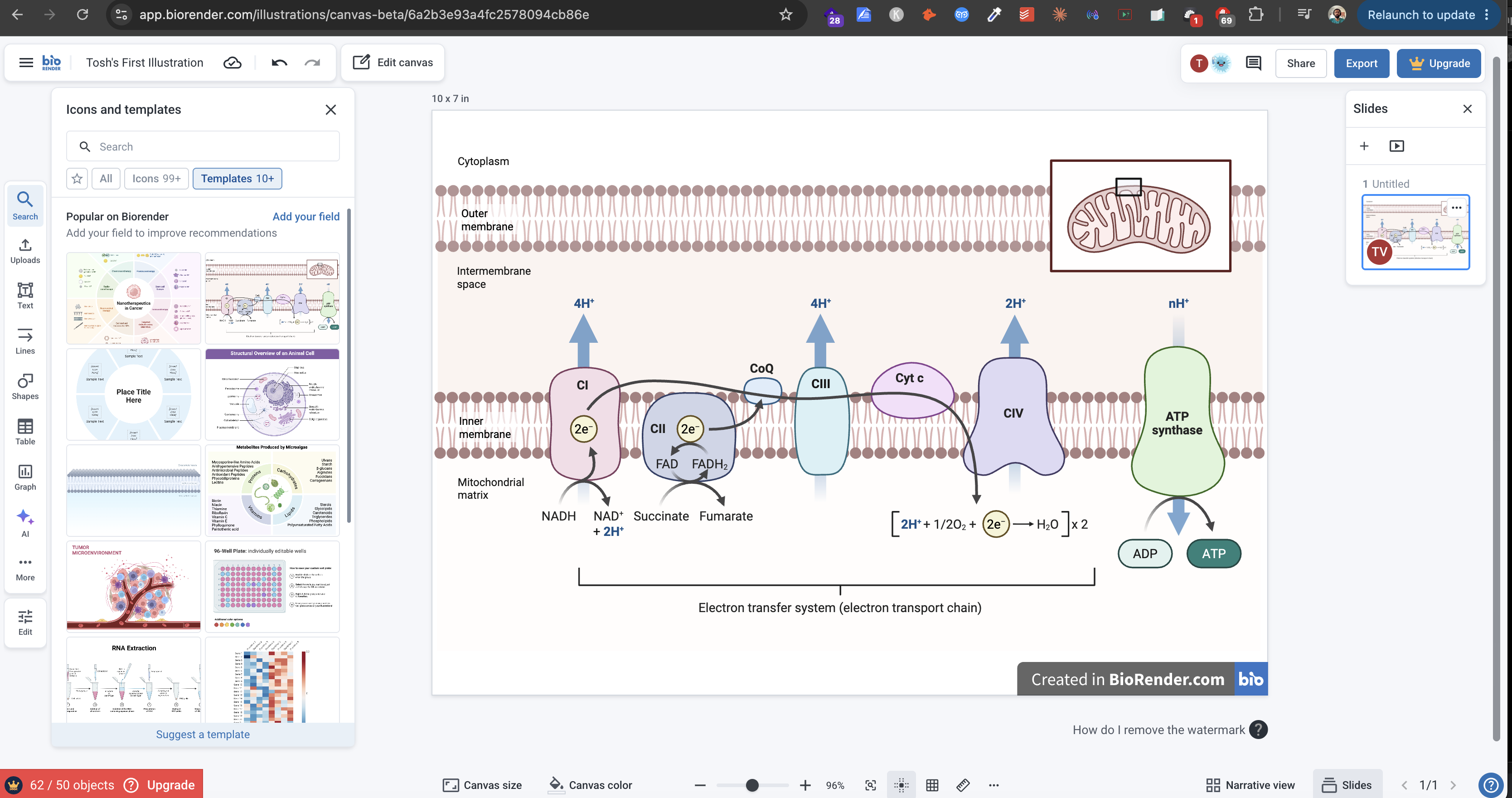 BioRender canvas interface showing drag-and-drop scientific illustration tools and icon library
BioRender's drag-and-drop canvas
BioRender built itself into the default tool for scientific illustration by doing one thing brilliantly: making it easy for non-designers to produce professional-looking figures. For a field where most researchers have never opened Adobe Illustrator, that was transformative. Today, more than 4 million researchers use it to build pathway diagrams, experimental schematics, and publication figures.
But "dominant" doesn't mean "without problems." Over the past two years, BioRender has become the center of significant controversy around copyright, open-access licensing, and cost—controversies serious enough that Georgia Tech evolutionary biologist Will Ratcliff publicly asked on X whether it was time to ditch BioRender entirely:
In 2026, that question is more relevant than ever.
This article breaks down what BioRender actually costs, what its real limitations are, and which alternatives are worth your attention—including tools built specifically for clinical and medical illustration.
BioRender Pricing: What You'll Actually Pay
BioRender offers a free tier, but its restrictions make it effectively unusable for most research purposes. Here's the full pricing breakdown as of 2026, sourced from BioRender's pricing page:
Free Plan — $0/month: You can access the canvas at no cost, but the restrictions go further than most users expect. All exports include a watermark that cannot be removed without a paid subscription. Basic features including adding text and using BioRender's AI tools are locked behind paid plans. You cannot use free-tier figures in publications, commercial materials, or grant submissions. For most researchers, the free plan is effectively a limited preview rather than a functional tool.
Academic Individual — $35/month (annual) or $39/month (monthly): Designed for researchers at universities, research institutes, NGOs, and government non-profits. This plan unlocks publication rights and premium icons, and it's what most academic researchers working independently will use.
Undergraduate — $20 per 4-month cycle: A discounted plan for students paying out of pocket with a verified .edu email. BioRender bills this in semester-length cycles rather than monthly. Note that the undergraduate plan does not include journal publication rights—students who need to publish figures require the Academic Individual plan instead.
Academic Lab — $99/month (annual) or $129/month (monthly): Covers a PI plus four lab members ($20/seat annually for additional members), with shared folders, commenting, and admin controls. For active labs producing figures regularly, this often works out to a better per-user rate than individual subscriptions.
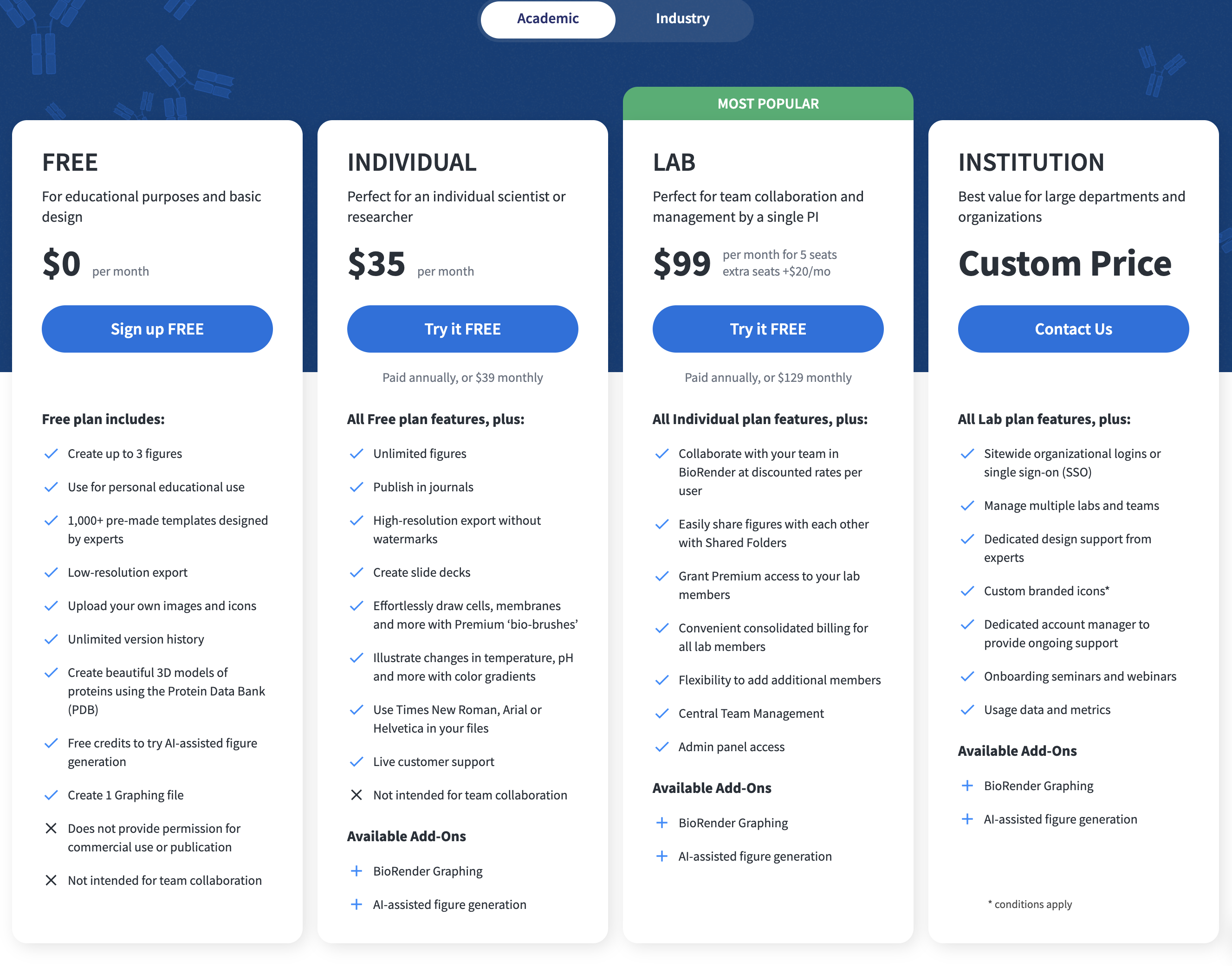 BioRender academic pricing plans showing Individual, Undergraduate, and Lab tiers
Industry Individual — $95/month (annual) or $115/month (monthly): For professionals at for-profit companies who use BioRender figures for commercial purposes.
Industry Team — $475/month (annual) or $570/month (monthly): Covers five seats with additional seats available. Includes expedited icon requests and centralized billing.
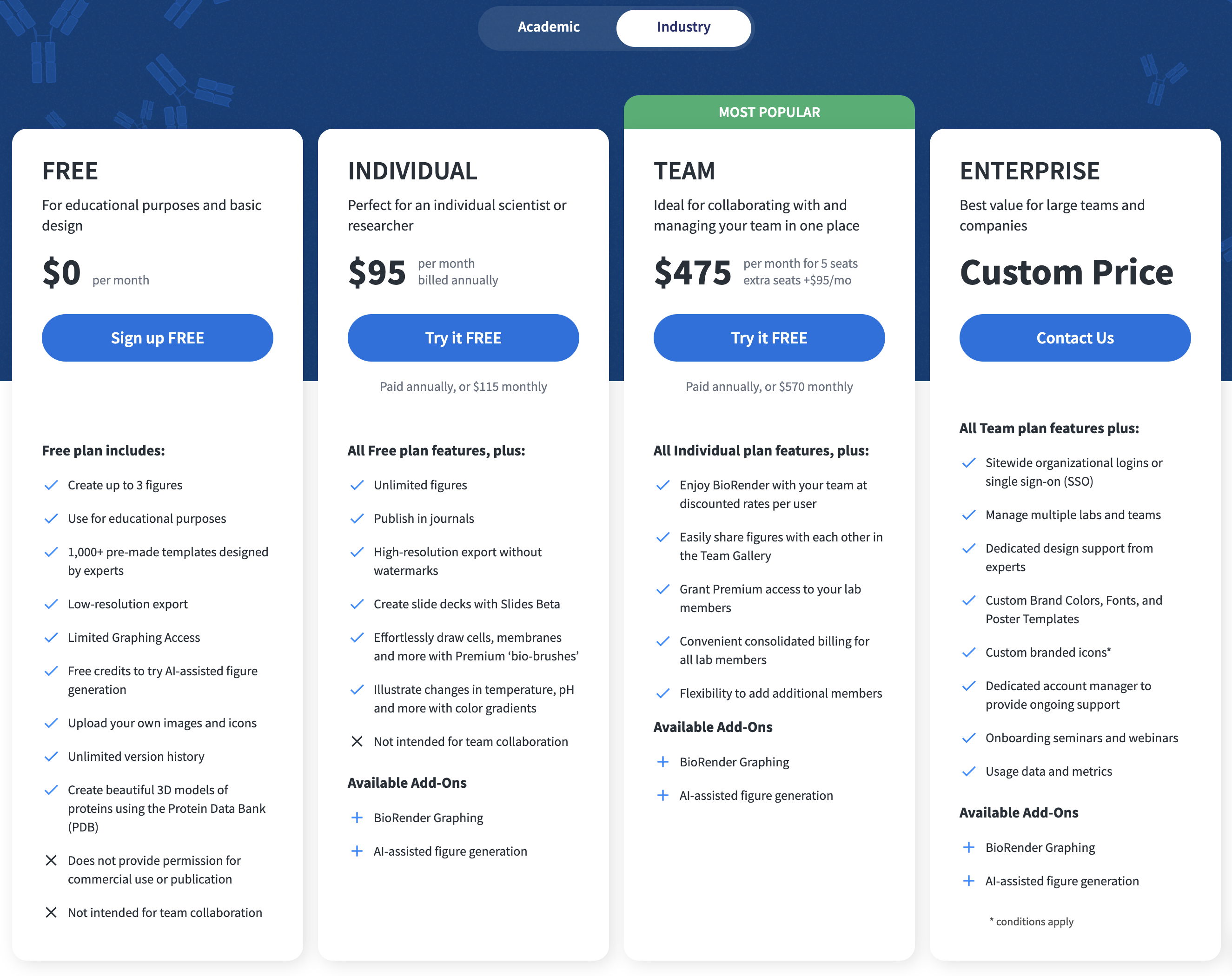 BioRender industry pricing plans showing Individual and Team tiers
Enterprise and Institution: Custom pricing, negotiated directly with BioRender, including SSO, multi-lab or multi-team management, custom branded icons, and dedicated account management.
Some universities have negotiated institutional licenses that bring per-user costs down significantly. Michigan State University subsidizes access for its researchers, and Boston University charges departments $135 per user with IT covering the remainder. If your institution has a deal, that's the best way to use BioRender affordably.
Is BioRender Free?
Technically yes — but practically no. The restrictions go well beyond just publication rights. Free exports include a permanent watermark. Adding text to your figures requires a paid plan. BioRender's AI tools are entirely paywalled. And you cannot use free-tier figures in journals, grant submissions, or any commercial materials.
This catches many new users off guard. Students often assume "free to create" means "free to publish." In practice, the free plan is closer to a limited demo — you can explore the interface, but you hit a paywall before doing anything a researcher would actually need.
BioRender's Copyright Problem: What Researchers Need to Know
The most significant limitation of BioRender isn't the price—it's the licensing structure, which generated substantial backlash in 2024 and remains unresolved in 2026.
The issue crystallized when Simon Dürr, a computational scientist at EPFL (École Polytechnique Fédérale de Lausanne) and founder of the free BioIcons repository, discovered that over 9,277 published studies contained BioRender figures published under Creative Commons CC-BY open-access licenses—yet BioRender's terms conflicted with what CC-BY actually permits.
When Dürr contacted BioRender to ask whether figures in two papers were free to reuse, he was told they weren't. The total number of affected papers rose to 12,059 when including other restrictive licenses.
Chemistry World covered the story in depth. Plagiarism Today's legal analysis identified a fundamental contradiction in BioRender's own terms: formal legal language stated BioRender owns copyright in modifications to its figures, while the plain-English version claimed "We DO NOT own the figures you create in BioRender." The analysis concluded there is no clear way to reconcile BioRender's business model—protecting 50,000+ proprietary icons—with CC-BY's requirement that derivative works be freely reusable by anyone.
BioRender updated its terms in September 2024, claiming to make its product "fully compatible with CC-BY 4.0." Dürr was unconvinced, identifying five specific contradictions that remained: the updated statement still requires author permission despite CC-BY allowing unrestricted use with attribution, demands users maintain BioRender accounts for certain reuse cases, limits commercial use when CC-BY explicitly permits it, and requires seeking permission from original authors unnecessarily. His advice to researchers: label BioRender figures as "Copyright BioRender All Rights Reserved" for legal clarity—even though this technically violates BioRender's own branding requirements.
Only one journal, eLife, has implemented a policy clearly labeling BioRender illustrations with different copyright terms than the rest of the paper. The thousands of existing papers with BioRender figures under CC-BY licenses remain in unresolved legal limbo.
How to Cite BioRender Figures
If you do use BioRender for publication, citation is mandatory. Here's how it works:
For original figures you create, the required credit is "Created with BioRender.com," included in the figure caption, references, or acknowledgments depending on journal guidelines.
For figures adapted from BioRender templates, the citation format is: "Adapted from '[Template Name]', by BioRender.com ([Year]). Retrieved from [URL]."
For open-access publications, you must generate a unique publication license URL through BioRender's export workflow. BioRender generates this automatically when you export with a publication license selected, and the unique URL must be included in your citation.
You typically don't need the publication license at the submission stage—journals usually request it after acceptance. Generate it early to avoid scrambling post-acceptance.
Other Meaningful Limitations
Beyond licensing, researchers frequently cite several other constraints:
Export resolution is capped at 600 DPI. BioRender's maximum export resolution is 600 DPI—sufficient for most journal submissions, but below what some high-impact publications require for certain figure types. Direct competitors like Mind the Graph export at up to 1200 DPI.
No offline access. BioRender is entirely web-based. For researchers in environments with unreliable internet—field sites, travel, or network outages—this is a genuine constraint.
Narrow disciplinary focus. BioRender's icon library is deep in molecular biology and cell biology but thinner in other scientific areas. Clinical medicine, surgery, anatomy, and the physical sciences have noticeably less coverage. Researchers in these fields often find themselves searching for icons that simply don't exist in the library.
The "BioRender look." With millions of users drawing from the same icon library, BioRender figures have developed a recognizable aesthetic. Some reviewers and editors have begun noting when figures look like templated BioRender outputs—which can undercut the impression of original scientific illustration.
Authorship and licensing friction. BioRender requires that the first author of a paper hold the license, regardless of who actually created the figure. If a graduate student builds a figure but doesn't have a subscription, the PI or first author must hold the license and export it. This creates administrative friction in collaborative lab environments.
BioRender Alternatives Comparison
| Tool | Starting Price | Max Export | Best For | Licensing |
|---|---|---|---|---|
| BioRender | $35/mo | 600 DPI | Molecular & cell biology schematics | Complex, CC-BY conflicts |
| Mind the Graph | $15/mo | 1200 DPI | General scientific illustrations | Full rights (paid) |
| Natomy | $20/mo | Publication-ready | Clinical photos, text-to-image, image-to-video | Clear |
| Illustrae | $8.99/mo | Publication-ready | Scientific figures & diagrams | Academic & commercial |
| FigureLabs | $11/mo | Publication-ready | AI-generated science diagrams | Full publication rights |
| SciDraw | Free | SVG | Pre-made science figures | CC-BY 4.0 (attribution req.) |
The Best BioRender Alternatives in 2026
Mind the Graph
Mind the Graph is the most direct BioRender competitor, with a library of over 75,000 scientific illustrations across 80+ fields. It exports at up to 1200 DPI compared to BioRender's 600 DPI, and its pricing starts at $15/month. For researchers who want similar drag-and-drop functionality with more flexible licensing and higher-resolution outputs, Mind the Graph is the most obvious switch. The free tier does watermark exports, but paid plans are significantly cheaper than BioRender's academic individual plan.
Natomy
For medical professionals working with clinical images—physicians documenting procedures, surgeons creating educational materials, researchers illustrating anatomical concepts—Natomy takes a different approach entirely. Rather than giving you a library of pre-made icons to assemble, Natomy transforms actual clinical photographs into professional anatomical illustrations. Upload a clinical photo and receive a publication-quality illustration that reflects your specific case, patient anatomy, or procedure. This matters in clinical medicine, where generic icons often don't capture the specificity that professional medical illustration requires—and where BioRender's library runs thin.
Natomy also supports text-to-image generation, letting you create accurate medical and clinical illustrations directly from a text description — no source photo required. And for dynamic content, you can convert any illustration into a short video clip, useful for presentations, social media, and patient education materials where a static image isn't enough.
Illustrae
Illustrae is a scientific illustration platform with AI-generated figures in Vintage, Modern, Photo-Real, and Custom styles. The Starter plan is $8.99/month (or $4.92/month billed annually) for 50 generations and 3 canvases, while the Unlimited plan covers unlimited generations and canvases. There's also a one-time Lifetime plan at $299. All plans include commercial and academic licensing — no separate publication license workflow required.
Free and Open-Source Options
Several solid free options exist for researchers with more time than budget:
NIH BioART offers free, public-domain scientific icons from the National Institutes of Health. Bioicons and SciDraw are community-built repositories of freely licensed scientific illustrations. Smart Servier Medical Art provides over 3,000 medical and biological images under Creative Commons Attribution licensing, which resolves the open-access conflict entirely.
FigureLabs
FigureLabs uses AI to generate scientific figures from text descriptions across biology, chemistry, physics, and medicine. At $11/month it sits in the middle of the market — more affordable than BioRender's academic plan while covering a broader range of scientific disciplines. As with all AI-generated scientific content, outputs require accuracy review before publication.
Should You Switch?
BioRender remains the most polished and widely recognized tool for molecular and cellular biology figures. If your institution has an institutional license and you publish primarily in subscription journals rather than open-access venues, the practical friction is low. The tool works, the outputs are professional, and reviewers recognize the format.
If you're in clinical medicine or anatomy, however, BioRender's icon library is likely to leave you frustrated—and this is where tools like Natomy become genuinely useful. Transforming your own clinical images into polished illustrations solves the specificity problem that generic icon libraries can't address.
If open-access publishing is central to your work, the September 2024 update did not resolve the fundamental CC-BY conflict. Dürr's recommendation is to label figures clearly as "Copyright BioRender All Rights Reserved"—which at least provides legal clarity, even if it's not what BioRender's branding guidelines prefer.
The broader lesson from this controversy is that tools controlling the licensing on content you create carry risks that aren't always obvious until they become problems. For long-term research workflows, licensing clarity matters as much as design capability.
Need professional medical illustrations from your clinical photos? Try Natomy at natomy.com. It's built specifically for physicians, surgeons, and medical researchers who need publication-quality medical illustrations without the constraints of generic icon libraries.
FAQ
Is BioRender free to use?+
BioRender has a free tier, but its restrictions make it nearly unusable for research. Free exports include a permanent watermark, adding text requires a paid plan, and AI tools are entirely paywalled. You also cannot use free-tier figures in publications, grant submissions, or commercial materials. Any professional use requires a paid subscription starting at $35/month for academic researchers.
How much does BioRender cost?+
BioRender's academic individual plan is $35/month billed annually ($39/month billed monthly). The academic lab plan covering five seats is $99/month annually ($129/month monthly). Industry individual plans are $95/month annually ($115/month monthly), and industry team plans are $475/month annually ($570/month monthly). Enterprise and institutional pricing is custom.
What is BioRender's maximum export resolution?+
BioRender exports at a maximum of 600 DPI. For most journal figure submissions this is sufficient, but it is below the 1200 DPI offered by competitors like Mind the Graph. If your target journal requires higher-resolution outputs, this is a practical constraint worth planning for.
Can I use BioRender figures in open-access publications?+
Yes, but with significant administrative overhead. You must generate a unique publication license URL through BioRender's export workflow for each figure published in an open-access journal, and include that URL in the figure citation. The fundamental conflict between BioRender's licensing terms and CC-BY's open-reuse requirements has not been fully resolved. If open-access publishing is central to your workflow, read BioRender's current licensing terms carefully before committing.
How do I cite BioRender figures?+
For figures you create, the required credit line is 'Created with BioRender.com.' For adapted templates: 'Adapted from [Template Name], by BioRender.com ([Year]). Retrieved from [URL].' For open-access publications, you must additionally generate and include a unique publication license URL via BioRender's export workflow.
What are the best free alternatives to BioRender?+
The strongest free options are the Bioicons or SciDraw icon repositories (freely licensed SVG figures), Smart Servier Medical Art (3,000+ CC-BY licensed medical images), and NIH BioART (public domain icons from the National Institutes of Health). All are free to use with attribution and work well combined with a free vector editor.
What are the best paid alternatives to BioRender?+
The strongest paid alternatives depend on your use case. For general scientific illustrations, Mind the Graph starts at $15/month. For AI-generated figures, FigureLabs is $11/month and Illustrae starts at $8.99/month. For medical and clinical illustration — converting clinical photos into publication-quality anatomical visuals, text-to-image generation, and image-to-video — Natomy starts at $20/month.
Ready to create your own medical illustrations?
Upload a clinical photo and generate a professional illustration in seconds.
Try Natomy →


